
Search in a brand-new window straight from the address bar.
Type @win followed by your query and hit enter. Quick Window Search opens the results in a fresh Firefox window — your current tab stays exactly where it is.

One command. Three quick beats.
No menus, no settings, no extra clicks — the omnibox is the only interface you need.
Type your command
Open a new tab, focus the address bar, and type @win followed by anything you'd normally search for.
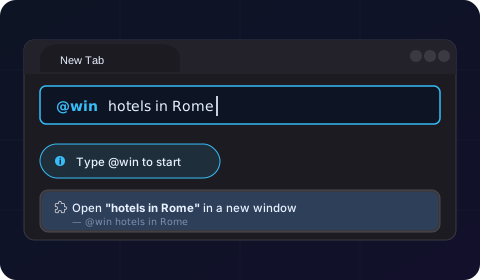
Hit Enter
The add-on detects the @win trigger instantly. No suggestions to scroll, no extra prompts — just press ↵.

A new window opens
Your query opens in a brand-new Firefox window powered by Bing. The tab you were on never moves — perfect for keeping your research split.

Built for people who live in the address bar.
Quick Window Search stays out of your way until you call it. Then it does exactly one thing — fast.

Command-driven
A single keyword — @win — turns the address bar into a launcher. No popups, no UI to learn.

Fresh window every time
Results land in a brand-new Firefox window, so your current research stays intact and your sessions stay organised.

Always-on, instant
No toggles, no settings page. The command is active the moment you install — and it stays active forever.

Quiet by design
No new tab takeover, no homepage swap, no toolbars. Quick Window Search only acts when you explicitly type the command.
Ready to launch searches in their own window?
Install Quick Window Search for Firefox — it's free, lightweight, and instantly active.
